

The three main question states
Workflow
Pubble helps you manage question workflow to improve the efficiency of handling visitor queries and lets you know which questions require attention.
There are three main states a question may be in at any one time New, In Progress and Closed
The aim of the workflow is to get questions into the closed state, this essentially means that the query has been resolved. The more closed questions, the more happy customers you have.
New Questions
These are fresh questions which have yet to receive a response. You should aim to respond to, or assign as many new questions as possible
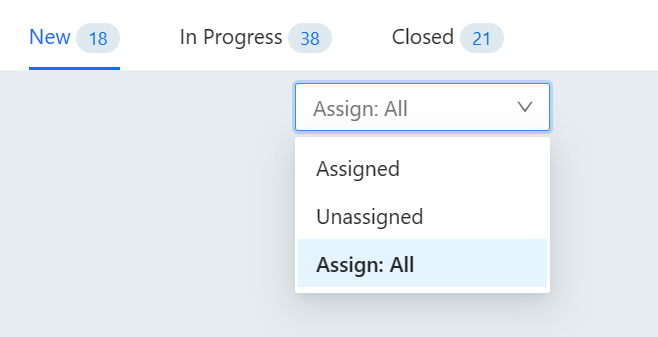
New Questions
There are three types of new question:
Unapproved: these are unapproved and will not appear in the public stream.
Unassigned: these are questions yet to be assigned to an agent.
Assigned: these are questions that have been assigned but are awaiting a response from agent.
In Progress Questions
These are questions where the conversation is still taking place. Once the question has been dealt with and the customer is happy, you should aim to close the question and remove it from the workflow.
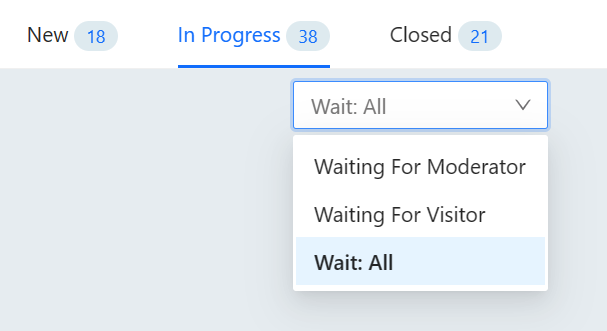
Questions In Progress
There are two types of question In Progress:
Waiting for moderator: these are conversations where the visitor was last to reply.
Waiting for visitor: these are conversations where the moderator was last to reply.
Closed Questions
These are questions that have been resolved. You should aim to get as many questions resolved as possible - this represents a job done. If need be a question can always be re-opened later and put back into the workflow.
Question Reminders
Sometimes you might need to follow-up on a question conversation at a later date. To help, you can set a reminder on a conversation to alert you. When a reminder is due those assigned to the question will be alerted in-app and also by email.
To set a reminder, open the conversation and view the right-hand panel and click 'Add Reminder', use the date picker to select a date and the drop-down to select a time.
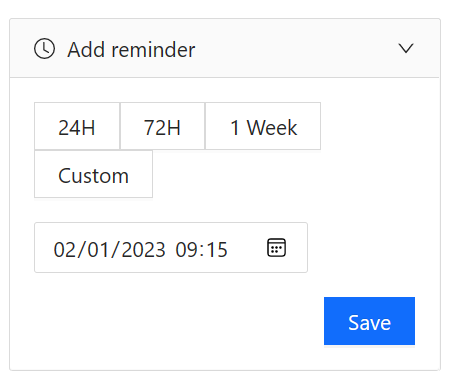
Setting a due date
Note: if you are using the Pubble Windows app, please make sure you are using version 0.0.4 or above to use the remind feature.